

Are you having trouble recovering your NCHMCT JEE 2026 password? No worries, we have got you covered. Read below to know in detail how to recover your NCHMCT JEE Login password and application number!

The NCHMCT JEE Login 2926 is the official online portal through which candidates access all major services related to the NCHMCT JEE 2026 exam . This login facility is hosted on the official examination website and acts as a personalized dashboard for applicants throughout the entire admission process. From application submission to counselling and seat allotment, the NCHMCT JEE login plays a crucial role in managing a candidate’s journey into hospitality education. Candidates can create their NCHMCT JEE 2026 login credentials during the registration process by providing basic details such as name, date of birth, email ID, and mobile number. Once registered, applicants can log in using their application number and password to complete the application form, upload documents, pay the examination fee, and track the status of their application. The login pf NCHMCT JEE 2026 ensures secure access to personal and academic information, making the process transparent and user-friendly.
Also Read: Top Colleges Accepting NCHMCT JEE Score
NCHMCT 2026 Highlights
All the important highlights of the NCHMCT JEE exam are provided below:
Exam Particulars | Exam Details |
|---|---|
Ongoing Event | NCHM JEE 2026 Registration |
Exam Name | National Council for Hotel Management & Catering Technology Joint Entrance Exam (NCHMCT JEE) |
Conducting Body | National Testing Agency (NTA) |
Exam Level | Undergraduate Exam at National level |
Exam Frequency | Once a year |
Mode of Exam | Computer Based Test |
Courses offered through Entrance Exam | |
Exam Fees |
|
Exam Duration | 3 hours |
Total Marks | 480 |
Total Questions | 120 |
Marking Scheme |
|
Language/Medium of Exam | English |
Colleges Accepting Exam Score | 21 central IHMs, 25 state IHMs,1 PSU IHM, and 27 Private IHMs that are affiliated to NCHMCT |
No. of Test Cities | 78 |
Official Website | nchmjee.nta.nic.in |
Details Required to Recover Your NCHMCT JEE Password
All the things that will be required to recover the password of NCHMCT are provided below -
- Email address provided by the candidate during the registration process
- Mobile number provided during the registration
- A good internet connection and updated web browser
Also Read:
How to Recover Your NCHMCT JEE Password?
Here's a step-by-step process to help you recover your NCHMCT JEE login account if you've forgotten your password:
- Step 1 - Visit the Official Website: Go to the official NCHMCT website. You can find it easily through an online search.
- Step 2 - Access the Login Page: Look for the "Candidate Login" section or a similar option on the website's homepage.
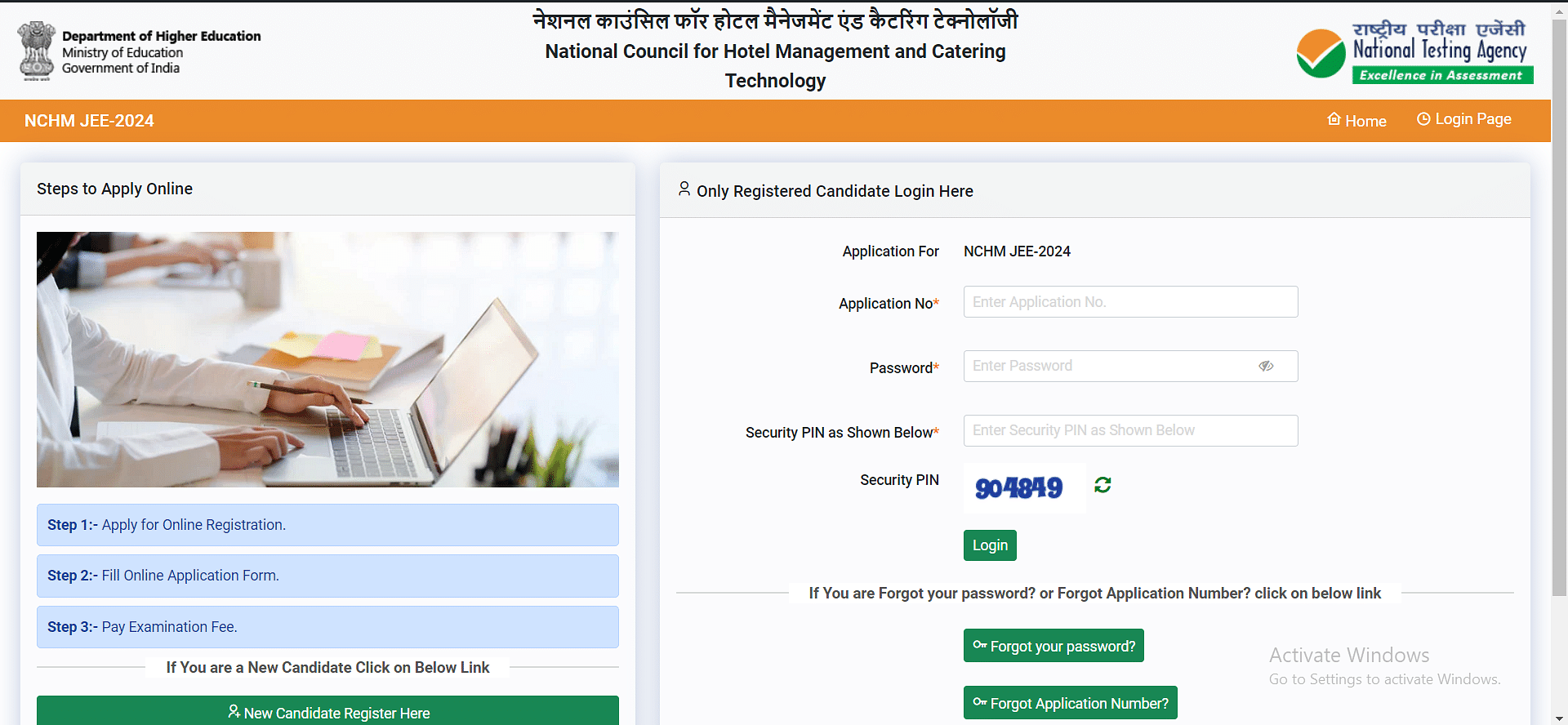
Step 3 - Click "Forgot Password": This option is usually near the login fields. Click on it to begin the password recovery process.
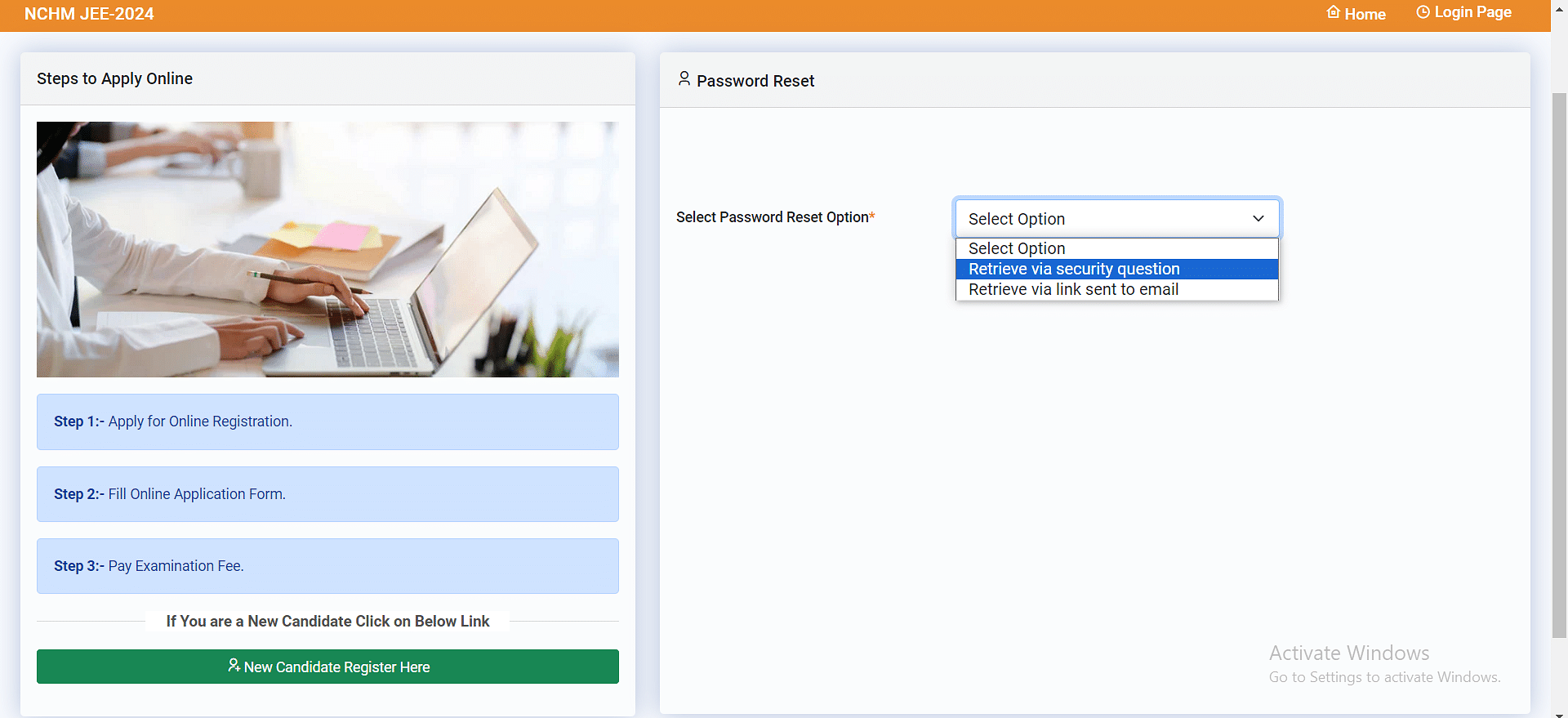
Step 4 - Choose Recovery Method: You will be prompted to choose how you want to reset your password:
Security Questions: Answer the security questions you set when you registered for your account.
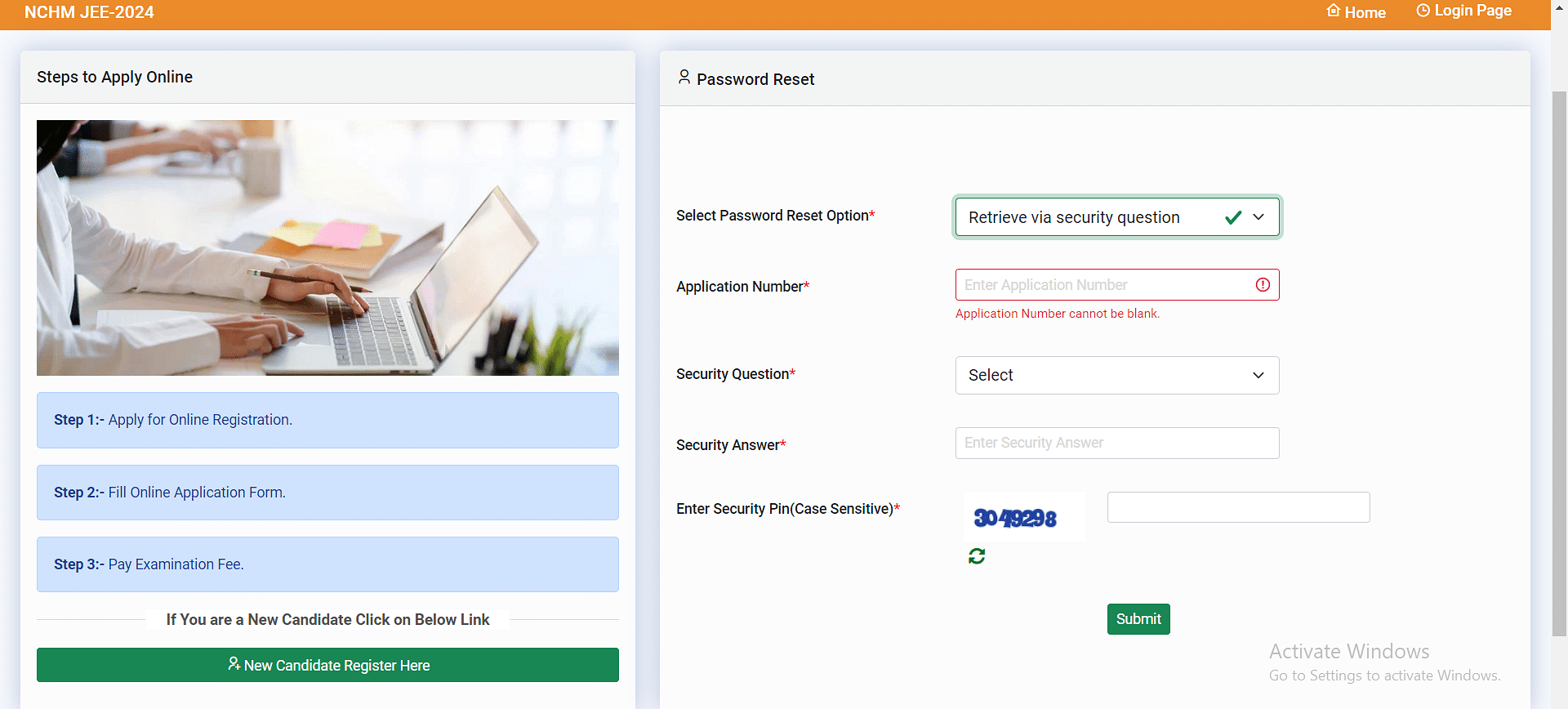
- Verification Code (SMS): Enter your registered mobile number to receive a one-time password (OTP) via text message.
- Reset Link (Email): Enter your registered email address to receive a password reset link via email.
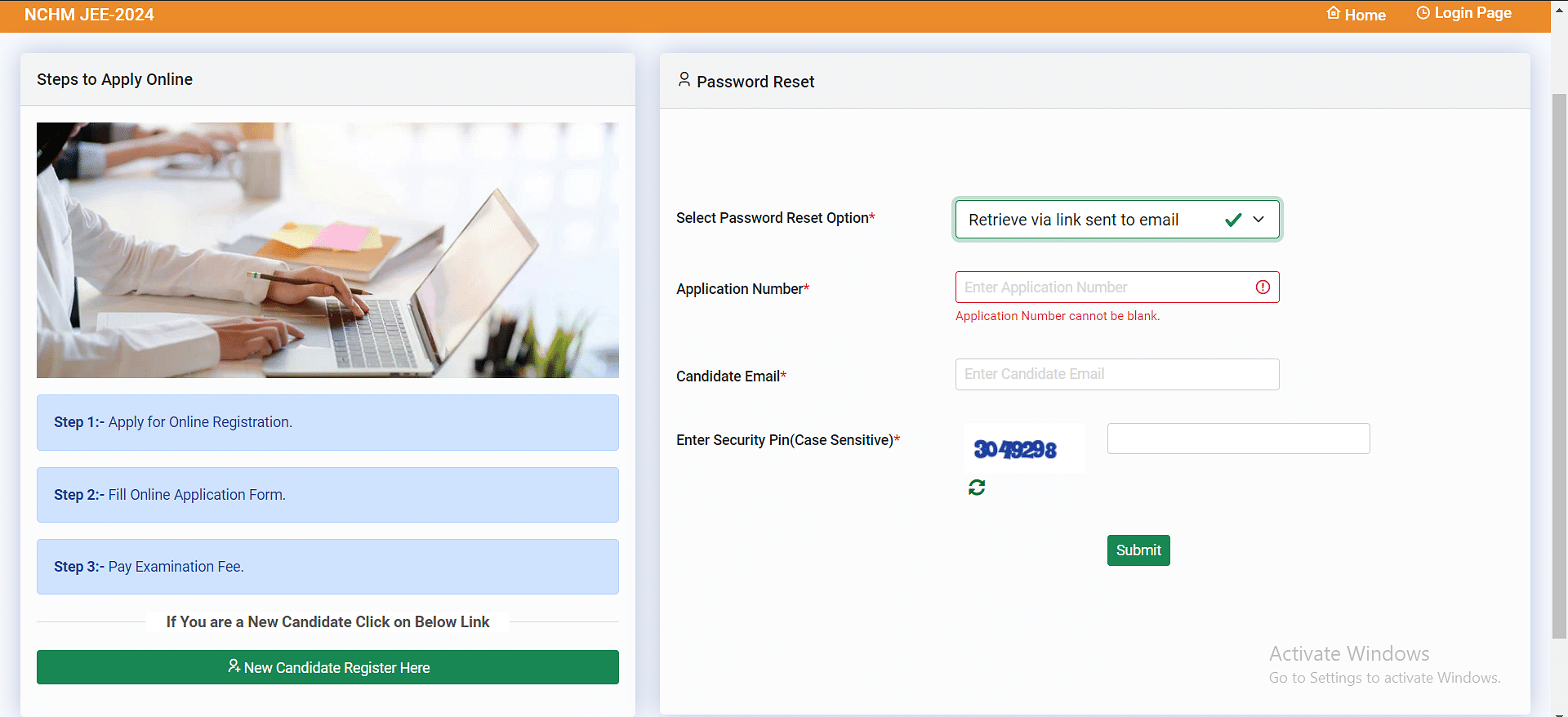
- Step 5 - Follow the Instructions: Depending on the method you choose, provide the necessary details as prompted and follow the instructions on the screen.
- Step 6 - Create a New Password: Once your identity is verified, you will be asked to create a new password for your NCHMCT JEE 2026 account. Make sure it's strong and easy for you to remember.
- Step 7 - (Optional) Update Email/Mobile Number: If you want to, you can update your registered email or mobile number to prevent future login issues.
Also Read:
How to Recover Your NCHMCT JEE Application Number?
Here's a step-by-step guide to recovering your lost NCHMCT JEE login application number for 2026:
- Step 1 - Visit the NCHM JEE Login Page: Start by heading to the official NCHMCT website. You might find them partnered with the NTA for managing the exam. Look for the "Login" or "Candidate Login" section on the website.
- STEP 2 - Find the "Forgot Application Number" Optio n: Once you are on the login page, keep an eye out for a section dedicated to account recovery. Look for a link or button labelled "Forgot Application Number" or something similar.
- Step 3 - Provide Necessary Information: The system might prompt you to provide certain details to verify your identity. This could include your registered email address, mobile number, your name (possibly your father's name too), or your date of birth.
- Step 4 - Submit and Retrieve: After entering the required details, hit the "Submit" button or its equivalent. If the information matches what they have on record, your application number should appear on the screen. Alternatively, you might receive it via email or SMS.
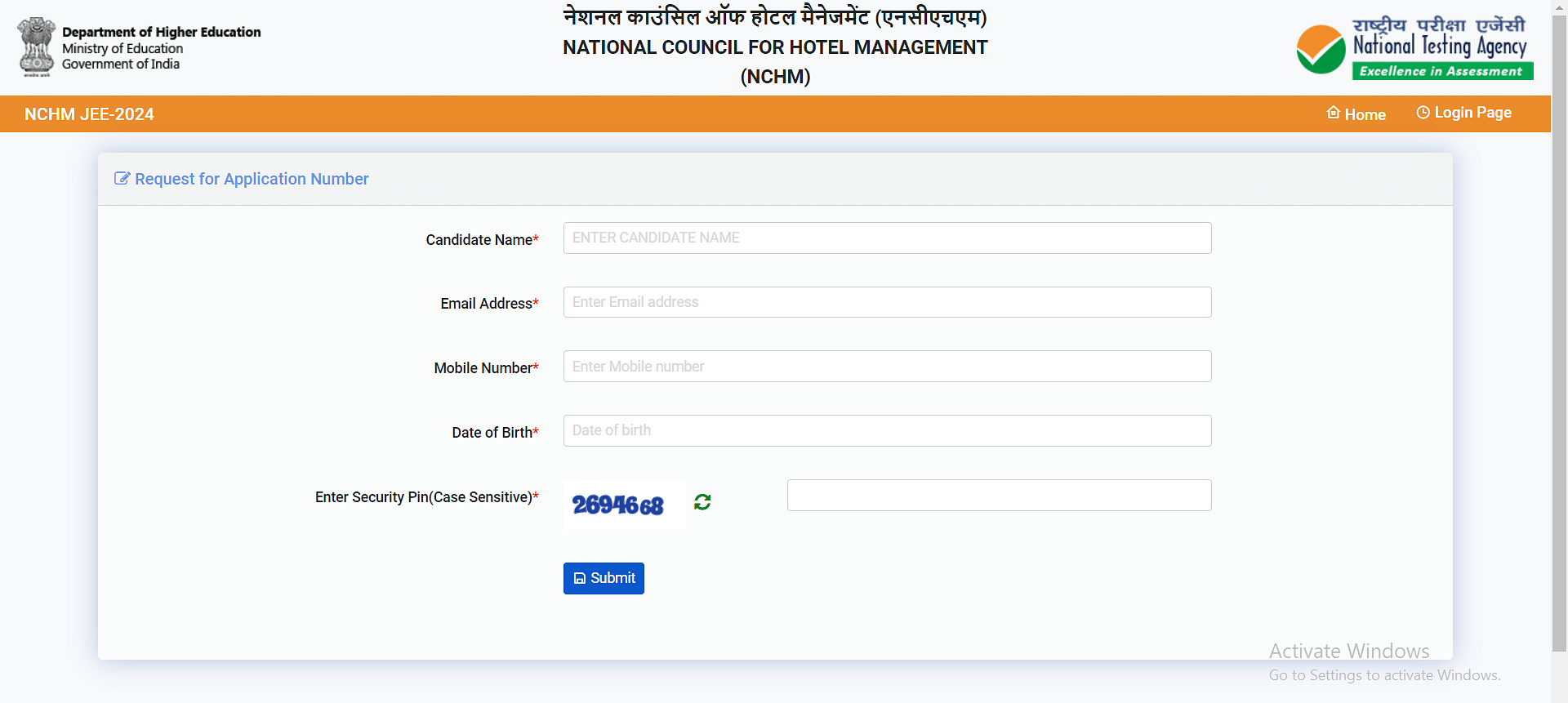
Candidates who are facing any issues while recovering the NCHMCT JEE login password and application number may clear their queries by asking questions on the Collegedekho QnA zone .
Are you feeling lost and unsure about what career path to take after completing 12th standard?
Say goodbye to confusion and hello to a bright future!

FAQs
An NCHMCT JEE login account is created during the online application process. Candidates must register using a valid email ID and mobile number, after which a unique application number and password are generated. These credentials are later used for all future logins.
The NCHMCT JEE login is essential because all critical information related to the exam is available only through this account. Without logging in, candidates cannot download their admit card, view their scorecard, or participate in counselling. It also serves as the official communication channel between NTA and applicants.
To recover your NCHMCT JEE login password, you will need either your registered email address or mobile number, depending on the chosen recovery method. The website might also request some additional details for verification, like your name or date of birth.
If you have forgotten your password for NCHMCT JEE, don't worry! Vist the NCHMCT JEE login page and look for the "Forgot Password" option. From there, you can select to get a reset link through email or a verification code via SMS, depending on how you registered. Once you receive the link or code, just follow the instructions to create a new password. It's simple and quick!
Was this article helpful?

















Similar Articles
Dress Code for AFCAT Exam Day 2026
Last Minute Preparation Tips for AFCAT 2026
Documents Required to Fill NCHMCT JEE 2026 Application Form: How to Upload, Specifications & More
AIMA UGAT BHM 2026 Syllabus: List of Important Topics, Best Books
Documents Required to Fill AIMA UGAT 2026 Application Form - Photo Specifications, Scanned Images
AFCAT EKT Exam 2026: Syllabus, Pattern and Prep Tips